


When CRM and ERP systems don’t communicate, your business risks inefficiencies, delays, and errors. Integrating these systems bridges the gap, enabling sales teams to access real-time inventory and production data while streamlining operations. It reduces manual tasks, eliminates data duplication, and aligns workflows across departments.
Here’s how you can implement CRM-ERP integration effectively:
- Involve cross-functional teams early to ensure all needs are addressed and workflows align.
- Audit and clean your data to avoid spreading errors and inconsistencies.
- Prioritize high-impact integration points, such as inventory, pricing, and sales orders.
- Choose scalable integration methods, like middleware or APIs, for long-term reliability.
- Thoroughly test the integration to ensure it handles edge cases and avoids disruptions.
- Leverage tools like QSTRAT to simplify integration and improve quoting accuracy.
- Regularly review and optimize the system to maintain accuracy, efficiency, and ROI.
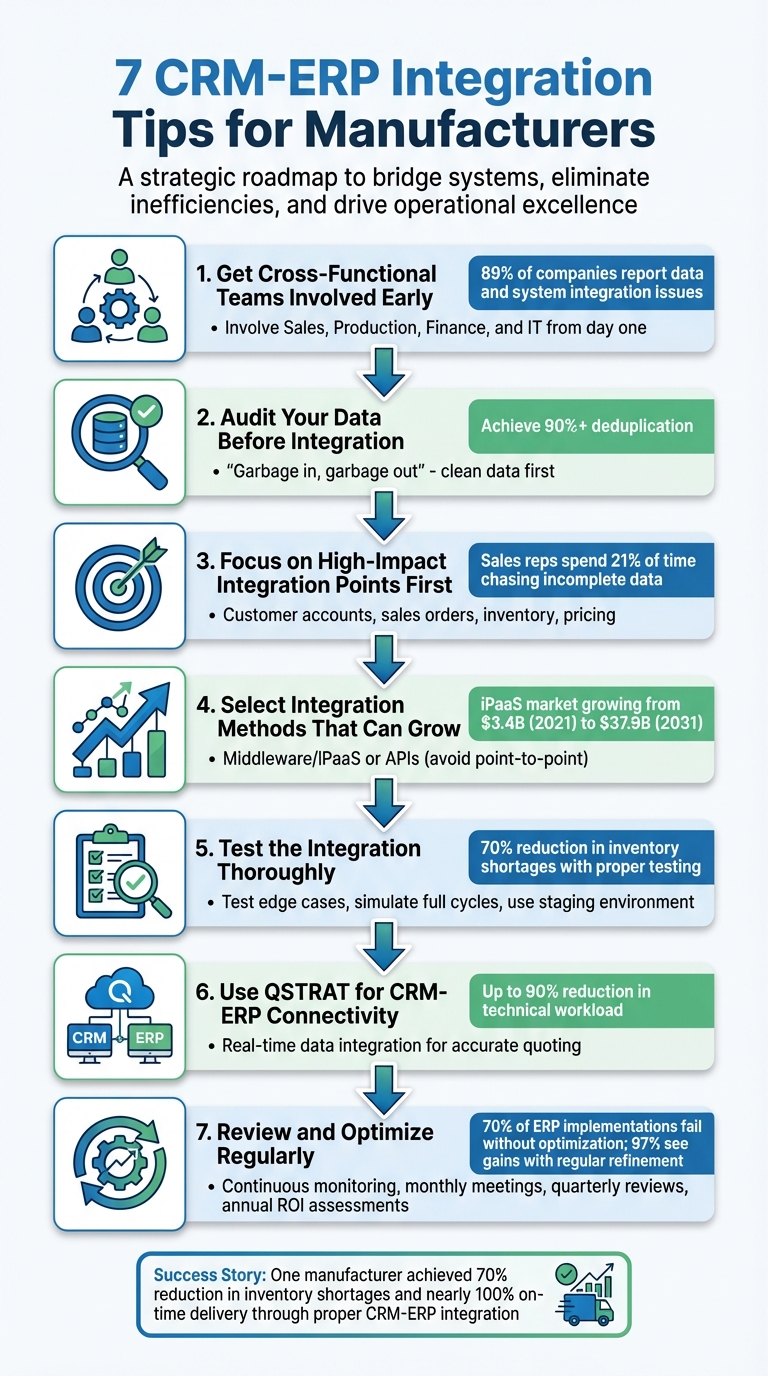
7 Steps for Successful CRM-ERP Integration in Manufacturing
How and When to Integrate an ERP with your CRM
1. Get Cross-Functional Teams Involved Early
Manufacturers have often faced challenges with siloed departments, making integration a daunting task. Lee Wylie, Group Vice President of Applications Research at Gartner, highlighted this issue, stating:
"Integration was difficult to impossible to say the least".
The key to overcoming these silos is to bring the right people together from the very beginning.
Leaving end-users out of the planning process can lead to overlooked requirements and costly rework. This is a common struggle, with 89% of companies reporting issues with data and system integration. Early collaboration ensures that everyone understands how integration will impact their daily workflows while fostering trust to ease the implementation process.
Different departments have unique needs: Sales depends on real-time inventory and credit terms from ERP systems for accurate quoting; production teams require sales forecasts to align schedules; finance needs CRM data for invoicing; and IT handles API connectivity and security protocols. By involving these groups early, you can map out how data flows between systems, avoiding conflicts and inefficiencies.
Appoint Subject Matter Experts (SMEs) from each department to act as bridges between developers and business users. Kick things off with a formal meeting where department heads agree on shared goals, such as improving quote-to-cash cycles or enhancing inventory accuracy. Before any technical work begins, conduct a thorough end-to-end process analysis to map data flows and pinpoint areas for improvement.
During these early discussions, establish clear rules for data ownership. Decide which system – CRM or ERP – will serve as the authoritative source for specific data like customer records or pricing. This eliminates duplicate entries and ensures everyone is working with consistent information. When production teams access sales notes and finance relies on real-time pipeline data, you create a solid integration foundation. This early alignment across teams sets the stage for smoother data management and future integration efforts.
2. Audit Your Data Before Integration
Before integrating your CRM and ERP systems, take a close look at your data. If your systems are cluttered with inaccurate or duplicate information, those issues will only multiply after integration. As NetSuite aptly puts it:
"One of the great truths about data processing is the cliché ‘garbage in, garbage out,’ and this is certainly the case for manufacturers".
Start by reviewing how fields are being used in both platforms. Look for redundant entries, such as "Employer" versus "Company", and watch for inconsistencies in formatting, like variations in how phone numbers are stored. Pay special attention to standardizing key data points like names, email addresses, and company information. The goal? Achieve over 90% deduplication.
To make this process easier, consider using deduplication tools. These can automate the task of spotting duplicates. Rather than simply deleting duplicate records, merge them thoughtfully to maintain the most accurate and complete information. Always back up your data before making bulk changes – just in case.
Next, decide which system will serve as your "single source of truth" for specific data types. For example, your ERP might be the go-to system for customer billing information, meaning updates should happen there first before syncing with the CRM. This strategy can help avoid the confusion described by Christina Jacobsen, Director of Revenue Operations at Jitterbit:
"With multiple sources of truth, employees lack trust in the data. They waste time validating and updating data between the CRM and ERP systems".
High-quality data is essential for enabling real-time workflows and ensuring smooth system integration.
Finally, establish validation rules to improve data consistency. For instance, enforce standardized formats for phone numbers or state abbreviations. Instead of deleting older records, archive them for future reference. And don’t forget to log all deletions and merges – it’s a lifesaver when troubleshooting issues later on.
3. Focus on High-Impact Integration Points First
Once your data is cleaned and audited, the next step is to prioritize integrating the most critical data flows. Instead of attempting to connect every data point simultaneously, start with the ones that deliver the greatest immediate value. In manufacturing, this often means focusing on key data flows like customer account details (names, billing and shipping addresses), sales orders and quotes, real-time inventory levels, and pricing information. These areas are essential for reducing manual work and minimizing errors. For instance, research shows sales representatives spend 21% of their time chasing down incomplete data.
Early integration efforts in these areas have shown measurable benefits, such as fewer inventory shortages and better delivery performance.
"Start integration with high-impact areas such as customer records, orders, pricing and inventory. Validating these foundational data flows helps identify issues early, provides visible return on investment (ROI) and builds confidence." – IBM
By focusing on these high-impact areas first, you ensure that all teams operate with consistent and reliable information.
To make this process seamless, assign a master system for each type of data. For example, your ERP system should typically handle financials and inventory, while your CRM manages customer interactions and deal stages. This approach eliminates confusion, prevents data conflicts, and ensures everyone is working with the same accurate data.
4. Select Integration Methods That Can Grow
When choosing integration methods, it’s crucial to pick ones that can handle increasing data and evolving systems over time. The right approach ensures your integration remains reliable as your business expands.
Point-to-point connections offer a straightforward way to link your CRM and ERP systems. While they’re quick to implement, they’re not built to grow. As your system evolves or you add new tools, these connections can become fragile. As noted, "Point-to-point setups may work for basic needs, but they’re brittle and hard to scale, especially as ERP solutions evolve or your tech stack grows". Any updates or new additions can easily disrupt these connections, creating more work down the line.
Middleware and iPaaS (Integration Platform as a Service) solutions provide a more flexible option. Acting as a central hub, these tools connect multiple systems using standard connectors, making it easier to add new platforms without rewriting code. They’re designed to grow with your business. For example, in 2024, Ampol, an Australian company, used Boomi‘s iPaaS platform to streamline its integrations. This approach cut development time by 70% and lowered integration costs by 30%. The global iPaaS market reflects this trend, with projections showing growth from $3.4 billion in 2021 to $37.9 billion by 2031. This scalability makes middleware and iPaaS a popular choice for businesses with expanding needs.
APIs (Application Programming Interfaces) offer a more tailored solution for unique workflows. They allow you to customize integrations to fit your specific requirements. As one expert explains, "Using an API, you can customize and integrate your ERP tool to integrate seamlessly… without limiting you to existing integration capabilities". However, APIs come with their own challenges. They require a skilled development team for ongoing maintenance and troubleshooting, particularly when dealing with API rate limits during high-volume data transfers.
For manufacturers, avoiding point-to-point connections is often the best strategy. Instead, middleware or API solutions are better suited for handling larger data volumes, supporting both batch and real-time synchronization, and adapting to system upgrades. These options provide the flexibility and reliability needed for long-term growth.
sbb-itb-827f251
5. Test the Integration Thoroughly
Testing is a critical step before going live. Skipping this phase can lead to bad data spreading across your systems, potentially derailing everything from order processing to production schedules. As Ken Jacobsen from The TM Group puts it:
"Integration doesn’t magically fix bad data – it spreads it faster."
Start by creating a staging environment that mirrors your production setup. This allows you to run tests without risking live operations. Simulate a complete manufacturing cycle: generate a sales order in your CRM, confirm that inventory updates correctly in your ERP, and ensure production schedules adjust to reflect new demand. This process bridges your planning and testing efforts, helping you resolve issues before they impact customers.
Don’t just test under perfect conditions. Include edge cases like missing fields, partial transactions, or unit conversion errors. Also, check how the system handles challenges like network timeouts or temporary errors. This ensures failed requests don’t result in duplicate orders or payments.
For instance, one manufacturer reduced inventory shortages by 70% and achieved nearly 100% on-time delivery by validating CRM-ERP data before launch.
As you refine your testing, involve stakeholders from various departments. Their input helps confirm that workflows align with real-world needs. Additionally, set up centralized monitoring with automated alerts to catch synchronization failures immediately.
Finally, avoid launching at the end of a reporting period. Instead, aim for a mid-period rollout to give yourself room to address any unexpected issues without disrupting critical reporting processes.
6. Use QSTRAT for CRM-ERP Connectivity
Using a platform like QSTRAT can make CRM-ERP connectivity much smoother, especially after thorough integration testing. While testing might uncover potential issues, QSTRAT is designed to tackle these challenges right from the start.
QSTRAT’s cloud-based solution bridges CRM, ERP, costing, and sourcing systems, solving a common pain point for manufacturers. As Samuel Thimothy, VP at OneIMS, puts it:
"For manufacturers, using separate systems to manage operations, sales, and customer information can hinder business growth."
Here’s how it works: when a sales inquiry comes in, QSTRAT pulls real-time ERP data – like labor rates, material costs, and inventory levels – and combines it with up-to-date supplier pricing. This eliminates the need for manual spreadsheets, which often slow down the quoting process and lead to pricing mistakes.
By integrating sourcing, costing, and CRM-ERP data, sales teams can produce accurate quotes based on current material costs and supplier availability. This ensures that quotes reflect production capacity and inventory constraints, reducing the risk of missed delivery deadlines.
QSTRAT also creates a "single source of truth" (Craig Powers, ERP Today) by automatically generating a Bill of Materials in the ERP system and initiating production planning workflows. This streamlined process can reduce technical workloads by up to 90%.
7. Review and Optimize Regularly
Getting your system up and running is just the beginning. Here’s a startling fact: 70% of ERP implementations fail to meet business case goals because optimization gets overlooked. On the flip side, 97% of organizations see major gains when they take the time to refine their systems over time.
To keep things running smoothly, establish a consistent review schedule. Here’s a simple breakdown:
- Use dashboards to continuously monitor system health.
- Host monthly meetings with teams like sales, operations, and finance to review performance.
- Conduct quarterly data integrity reviews to ensure accuracy.
- Perform annual ROI assessments to measure overall success.
Tracking the right KPIs is critical. Focus on these four areas to evaluate integration performance and identify areas for improvement:
- Customer: Metrics like response times and case resolution rates.
- Sales: Monitor quote-to-cash cycle time and conversion rates.
- Operations: Keep an eye on inventory accuracy and fulfillment times.
- Finance: Track cost per transaction and profit margins.
And don’t just track – set clear, measurable goals to guide your reviews. As Datix Inc. puts it:
"Setting specific, achievable and measurable goals will ensure that you can accurately track the success of your project against real numbers and real expectations." – Datix Inc.
One more thing: inaccurate data is a silent productivity killer. Did you know sales reps can lose 21% of their time dealing with bad data? Regular audits are your best defense against this. Assign team members to maintain data accuracy, and make sure employees get updated training as workflows evolve. Keeping your data clean ensures your system remains a reliable single source of truth.
Conclusion
Bringing CRM and ERP systems together is not a one-and-done task. It demands thoughtful planning, thorough testing, and ongoing adjustments. As Nexdriver wisely notes:
"Integrating your ERP and CRM systems is not a set-it-and-forget-it project; it’s a system that needs attention to stay strong".
This effort pays off in tangible ways. For instance, a machine manufacturer cut inventory shortages by 70% and achieved nearly 100% on-time delivery after aligning their systems. Another company slashed development timelines by 70% and reduced integration costs by 30% with the help of a low-code platform. These successes highlight the value of prioritizing critical workflows, ensuring data quality, and creating a unified source of truth.
To achieve similar results, define clear KPIs like inventory accuracy, order processing time, and days sales outstanding. From the start, align teams across sales, production, and finance to streamline workflows.
Opt for scalable solutions such as APIs or iPaaS, which adapt to your growing needs, instead of rigid point-to-point connections that may hinder future expansion. Test for real-world challenges – like missing fields or incomplete transactions – to ensure your system can handle them. Once operational, set up automated alerts and dashboards to catch synchronization issues before they disrupt your business.
The manufacturing sector is shifting quickly, with the global CRM software market expected to surpass $98.4 billion by 2025. Companies that treat integration as a strategic opportunity rather than a technical hurdle will stand out. Keep refining, stay proactive, and ensure your systems evolve in step with your business goals.
FAQs
Why should cross-functional teams be involved early in CRM-ERP integration?
Involving cross-functional teams early in a CRM-ERP integration process is crucial for creating a system that serves the needs of every department – whether it’s sales, manufacturing, supply chain, or customer service. When these teams collaborate from the start, it becomes easier to identify essential data points, streamline workflows, and prevent information silos that could disrupt efficiency or cause errors later on.
This early teamwork also strengthens collaboration across departments, secures stakeholder support, and ensures the integrated system works seamlessly for end-to-end processes – covering everything from customer relationship management to production and supply chain operations. By taking this step upfront, businesses can avoid miscommunication, minimize costly changes, and sidestep delays, resulting in a smoother implementation and improved system performance.
Why are middleware or APIs better than point-to-point connections for system integration?
Middleware and APIs offer a smarter, more scalable way to connect systems compared to traditional point-to-point setups. Instead of relying on a web of direct connections, they streamline communication between multiple systems, making integration far easier to manage – especially as your business expands.
By using middleware or APIs, you can benefit from real-time data synchronization, quicker implementation timelines, and smoother system upgrades or adjustments. This approach keeps your integrations running efficiently while staying flexible enough to adapt to changing business demands, all without piling on extra complexity.
Why are regular reviews and optimizations important for CRM-ERP integration?
To get the most out of your CRM-ERP integration, regular reviews and updates are a must. By evaluating workflows and system performance on a consistent basis, you can spot inefficiencies, refresh outdated processes, and ensure your data stays accurate. This keeps your integration aligned with your business’s evolving needs and objectives.
Adjustments aren’t just about fixing what’s broken – they’re also about staying ahead. As markets shift and technology evolves, periodic optimizations help you remain competitive. Conducting system audits and providing ongoing employee training can improve how your team uses the system, eliminate redundancies, and preserve a reliable single source of truth. These efforts lead to better data quality, improved productivity, and set your organization up for long-term success.
Related Blog Posts
You may also like

Automotive Quoting Software: Features to Look For
Key features for faster, accurate automotive quoting: ERP/CRM integration, RFQ automation, supplier performance, configurable rules, and cloud collaboration.

Supplier Escalations: Managing Critical Issues
Practical framework to detect, escalate, and resolve supplier quality, delivery, and contract issues with thresholds, escalation matrix, KPIs and docs.